Alternative Integration
Other ways of using Home Assistant REPL without using the supplied shell.
Using homeassistant_repl from Plain Python
The api mode REPL above is just a thin wrapper around homeassistant_repl.connect() - the same call works from a one-off script, a notebook, or an interactive python -m asyncio session (the standard library's REPL that supports top-level await, unlike plain python), with no dependency on the ha-repl executable at all.
Install the package first (pip install homeassistant-repl, or uv add homeassistant-repl in a project) - the importable package is named homeassistant_repl.
$ python -m asyncio
>>> import homeassistant_repl
>>> obj = await homeassistant_repl.connect()  # reads $HASS_SERVER/$HASS_TOKEN, same as the CLI
>>> obj["/rflink/binary_sensor/hall_pir"].state
'off'
>>> [e.entity_id for e in obj.find(domain="light")]
['light.kitchen_lights', 'light.shed']
Or pass the URL/token explicitly rather than via environment variables, and use it in a script with asyncio.run:
import asyncio
import homeassistant_repl


async def main() -> None:
    obj = await homeassistant_repl.connect(
        url="http://homeassistant.local:8123", token="..."
    )
    print(obj["/rflink/binary_sensor/hall_pir"].state)


asyncio.run(main())
obj behaves identically to the one bound in the REPL - everything under The Object Tree below applies. connect() only gets you api mode (read-only, no hass); custom mode's live object tree requires the ha_repl_server HACS component and talks to it over the same underlying Client, but isn't exposed as a standalone importable helper.
By default the cached snapshot is reused for 30 seconds (ttl= to change that) and the websocket connection is left open for the life of the process; call await obj.cache.refresh() for a fresh snapshot on demand, or await obj.cache.client.close() when you're done with it if that matters for your script.
iPython Example
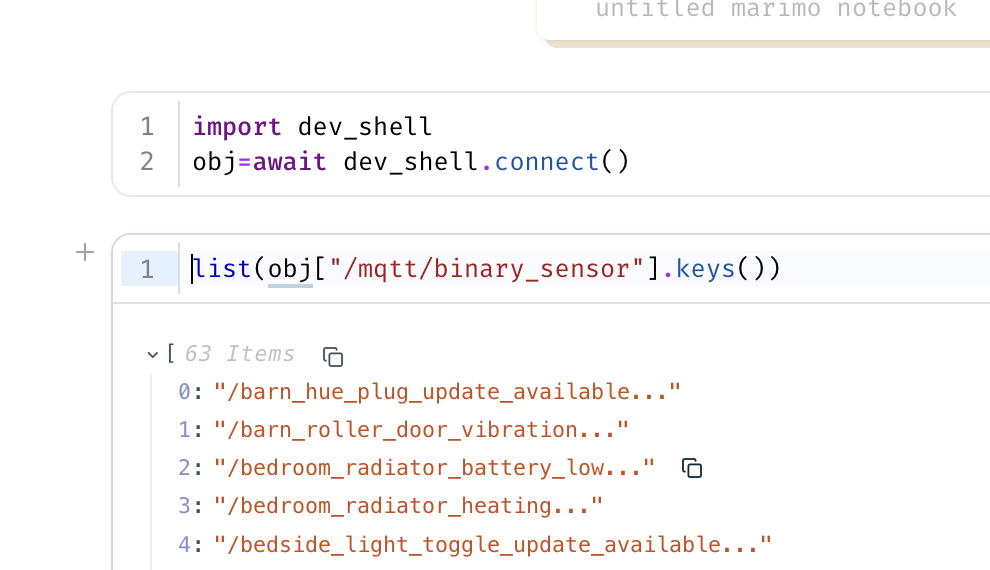
Marimo Example
Install Local Home Assistant with the Custom Mode Server
Dev instance (devcontainer, or directly on a host with Python 3.14):
dev/setup.sh                 # installs HA into its own venv + the CLI (devcontainer runs this)
dev/run-ha.sh                # HA on :8123 with custom_components/ha_repl_server symlinked in
uv run python dev/bootstrap.py   # onboard (user dev/dev) and write dev/.env with a token
Using it (host or container):